
YAML to JSON Converter
The best YAML to JSON converter available online. Convert YAML instantly with a fast, free tool. No sign-up required. Copy or download your JSON output.
YAML to JSON Converter
Convert YAML to clean, formatted JSON instantly. Paste your YAML, pick indent size, and get valid JSON.
JSON Indent Size
2 spacesHow it works
- 1.Paste YAML into the input
- 2.Choose JSON indent size
- 3.Click "Convert to JSON"
- 4.Copy or download the result
JSON output appears here
Paste YAML and click Convert
The Best, Free, Fast and secure YAML to JSON converter available online. Use the above tool to convert your YAML into clean and readable JSON format. Whether you are managing server configurations, deploying applications, or working with APIs, our tool makes the entire process effortless and error-free.
How to Convert YAML to JSON (Step-by-Step)
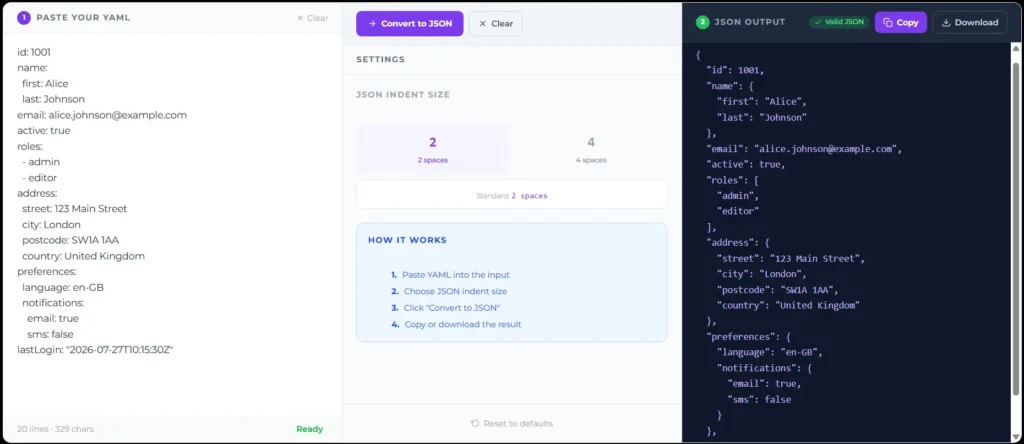
The following are the steps that you can follow to convert YAML to JSON:
What is YAML to JSON Conversion?
To understand how YAML is converted into JSON, you first need to know what these two formats do. YAML (YAML Ain’t Markup Language) is a human readable data format used mainly for writing configuration files. JSON (JavaScript Object Notation) is a lightweight format used by machines, web browsers, and applications to store transparent data.
Converting YAML to JSOn means transforming human friendly configuration text into a structured format that a computer system or API can easily read, parse and process.
YAML vs. JSON: Key Differences
Following is the quick comparison of the two formats:
| Feature | YAML | JSON |
| Readability | High (Relies on spaces) | Medium (Relies on brackets) |
| Comments | Supported (#) | Not Supported |
| Data Types | Complex (Supports dates) | Basic (Strings, numbers, booleans) |
| Best For | Config files (Docker) | APIs and web data transfer |
Why Convert YAML to JSON?
You might be thinking why there is a need to convert YAML to JSON. The main reason is software compatibility. While humans prefer reading YAML because it is easy to understand, most of the modern programming language web browsers REST APIs are designed to understand JSON. By converting your data, you cover the gap between human input and machine processing.
Common Developer Use Cases
Developers use this conversion every day for several important tasks:
YAML Features That Do Not Convert to JSON
When you are converting YAML to JSON, you need to be aware that some yaml Features are not converted into JSON. JSON is much stricter than YAML, this means that some features will be lost or removed during the process.
How to Convert YAML to JSON Programmatically
If you are building an application, you might want to convert data automatically without relying on an online YAML to JSON Converter. The following are the two ways to do it in two popular languages using built-in libraries or external packages from npm.
In Python:
You can achieve this using the pyyaml and json libraries. First, load the YAML file data using the yaml.safe_load() function. Once the data is loaded as a Python dictionary, you can easily save it as JSON using the json.dumps() function.
In Node.js:
You can use the popular js-yaml package. First, read the file using fs.readFileSync. Next, parse the content using yaml.load(). Finally, stringify the resulting object using the native JSON.stringify() method to get your final JSON output.